
Recording settings in the Voice panel
Last updated: 27 October 2026 · 4 min read
Recording for a Calls (Clomni Voice) inbox is turned on in the Voice panel. A call's recording is added to the call message in the conversation in Clomni.
Steps
-
1
Turn recording on
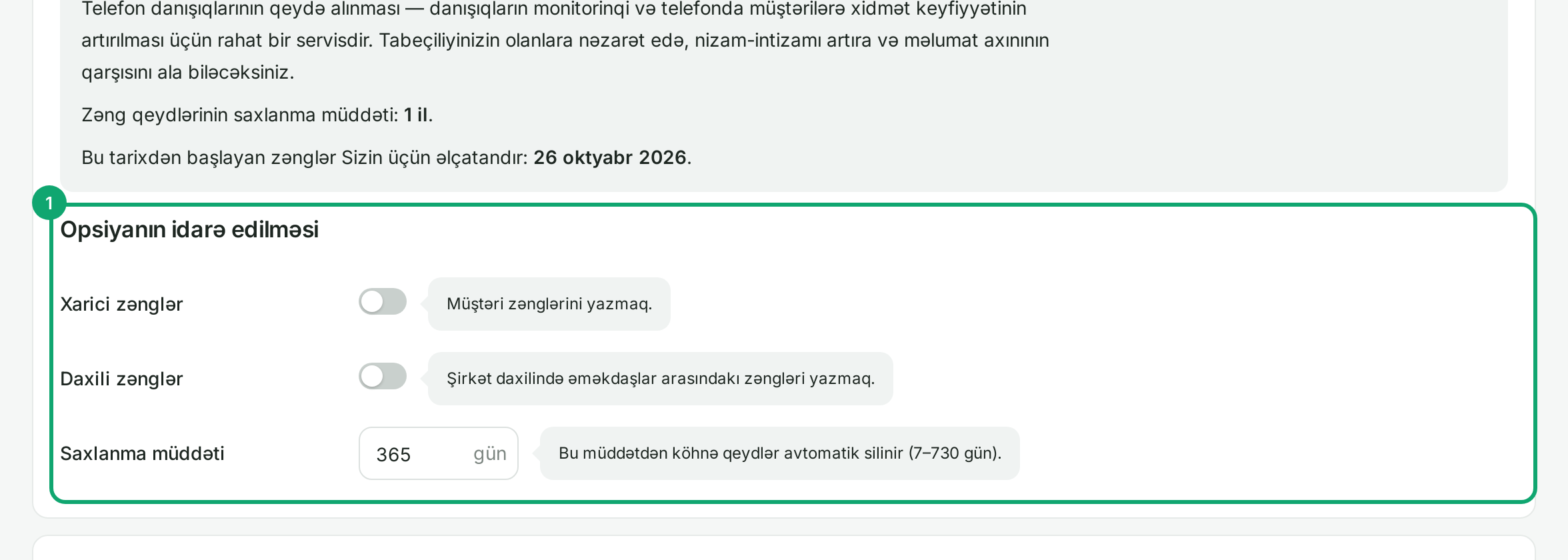
On “Ayarlar › Bütün ayarlar › Zənglərin qeydə alınması” (Settings › All settings › Call recording), turn on “Xarici zənglər” (External calls, with customers) and “Daxili zənglər” (Internal calls, between employees). In “Saxlanma müddəti” (Retention period), enter how many days Voice keeps a recording, from 7 to 730. Older recordings are deleted from Voice automatically.
-
2
Tell the customer
In “Zəngin qeydə alınması barədə bildiriş” (Recording notice), turn on “Bildirişi işə sal” (Turn on the notice): the customer hears that the call is recorded before the conversation starts. Choose the message with “Standart” (Standard) or your own file.
-
3
Do not record some calls
In “Zəngləri yazmamaq” (Do not record), choose the employees and departments whose calls must not be recorded. Then click “Yaddaşda saxla” (Save).
-
4
Where to listen
A call's recording appears in Clomni, in the call message of that conversation, and Clomni keeps its own copy. The Voice panel has no call history.