
Call supervision: listen, whisper and join
Last updated: 27 October 2026 · 6 min read
An administrator can join an agent's call with a customer: to listen quietly, to help only the agent, or to join the conversation. This works for calls on Voice lines.
Steps
-
1
Who can do it
An administrator who has an extension and can see a Voice inbox. Your status must be “Online” or “Busy”: when you join, the call comes to your browser. Allow the microphone.
-
2
See calls in progress
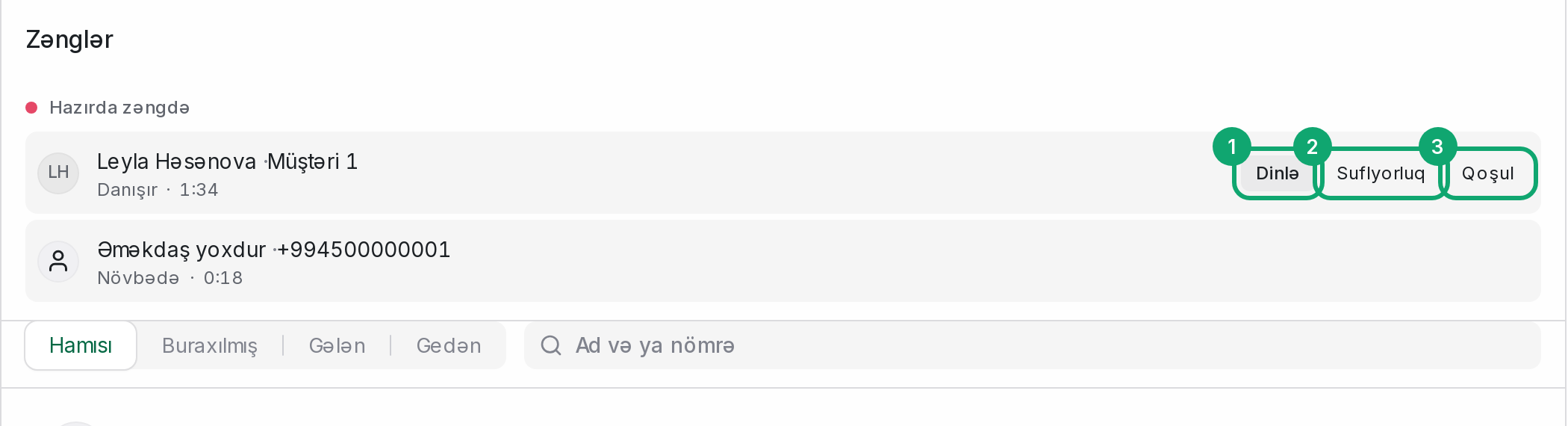
Open Conversations › “Calls” in the left menu. At the top is the “On a call now” section (it is hidden when no call is in progress). Each row shows the agent, the customer, the state and the duration. The state is “Talking”, “On hold”, “Waiting”, “In the menu”, “Dialing” or “In voicemail”. The list refreshes every 5 seconds.
-
3
Join a call
When the agent is talking or has the customer on hold, the row has three buttons:
- “Listen”: nobody hears you.
- “Whisper”: only the agent hears you.
- “Join”: both sides hear you.
When you click one, a call card opens in your browser and connects by itself. You can't join your own call. You also can't join a call that is waiting or in the menu: no agent has it yet.
-
4
Switch the mode
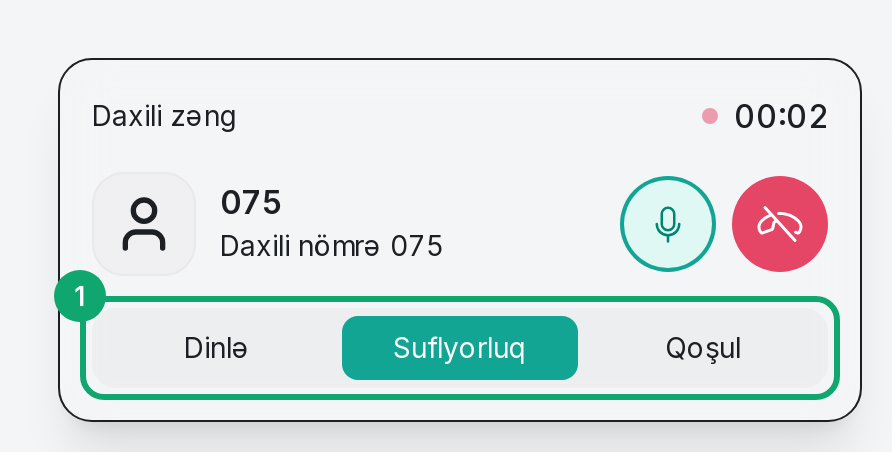
Once you are in, the card has three buttons: “Listen”, “Whisper”, “Join”. You can switch between them without ending the call.
-
5
Leave
Click the red button (“End call”) on the card. Only you leave; the agent and the customer keep talking.
-
6
If joining fails
If “Could not join the call” appears, check your status and the microphone permission, then try again. If the call has already ended, its row leaves the list within a few seconds.