
Why you cannot answer a call to a QR number
Last updated: 27 September 2026 · 3 min read
A WhatsApp QR connection works through the WhatsApp Web protocol. This protocol reports an incoming call, but it does not pass the call's audio to a linked device. That is why you cannot answer an incoming call from the dashboard.
Steps
-
1
Where an incoming call appears
The call is recorded in the customer's conversation as “Incoming call” or “Missed call”. It also appears in the “Incoming Calls” list in the Conversations section of the left menu.
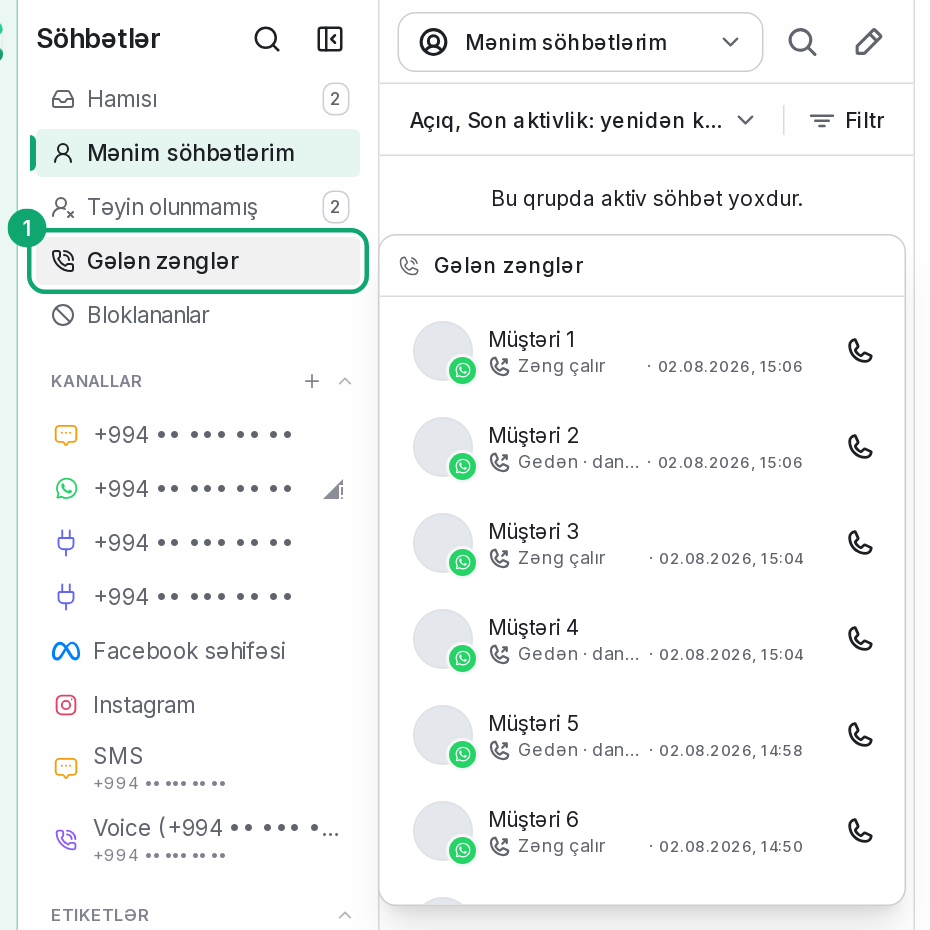
-
2
Answer on the phone
You can answer the call on the number's phone. The conversation then shows “Answered on the phone”. The length of the call is not shown, because WhatsApp does not report it to the linked device.
-
3
Call back yourself
Call the customer with the “Start WhatsApp call” button in the conversation header. If the customer's number is unknown (the customer wrote with their number hidden), this button does not appear.
