
Other settings in the Voice panel
Last updated: 27 October 2026 · 5 min read
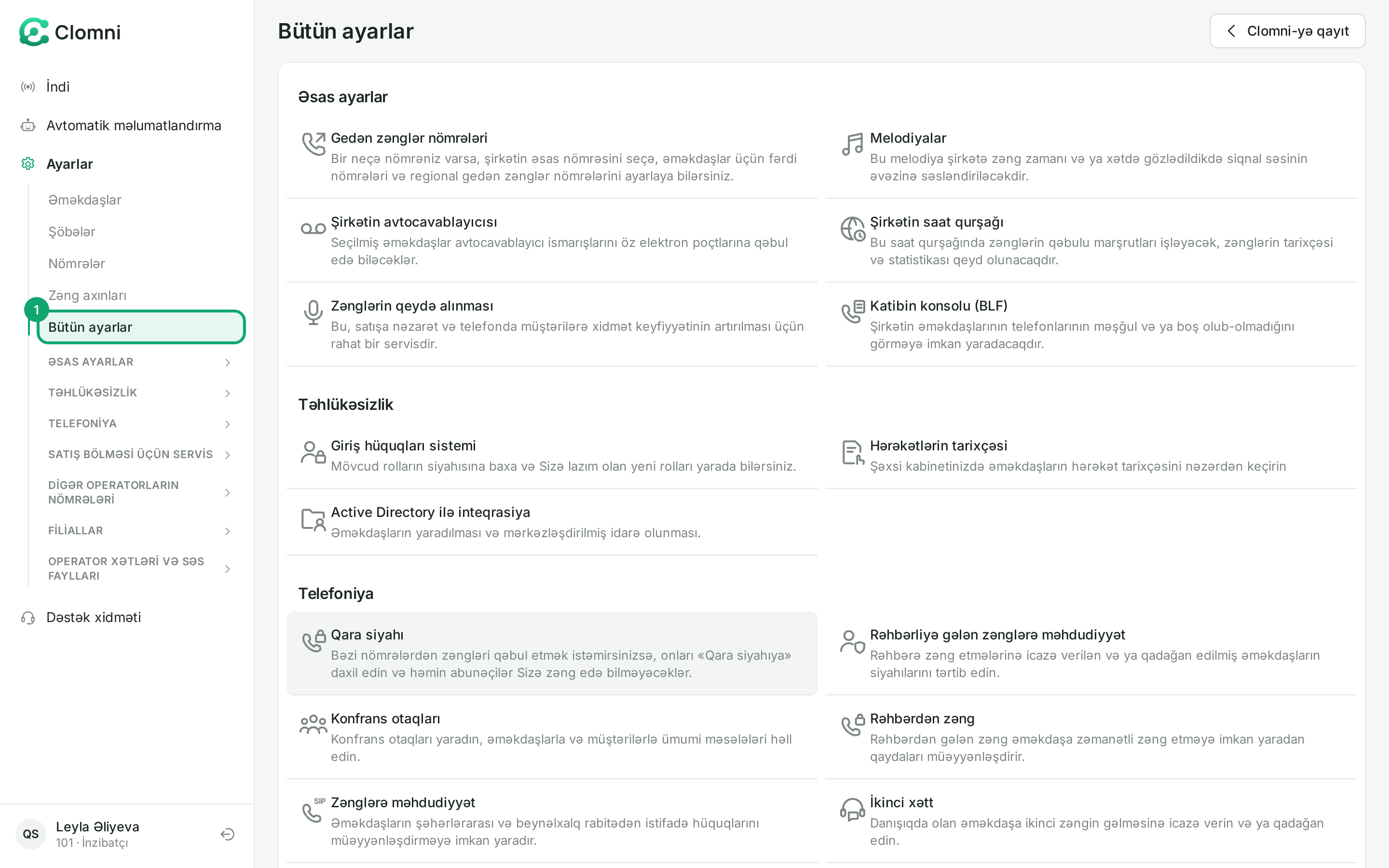
On the Voice panel's “Ayarlar › Bütün ayarlar” (Settings › All settings) page, the remaining settings are grouped as cards. Here is a short guide to the ones you need day to day.
Steps
-
1
Open All settings
In the Voice panel, click “Bütün ayarlar” (All settings) on the left. The cards are grouped: “Əsas ayarlar” (Main settings), “Təhlükəsizlik” (Security), “Telefoniya” (Telephony) and others. The same groups open and close in the left menu too.
-
2
Main settings
- “Gedən zənglər nömrələri” (Outgoing numbers): which number a call dialled from a desk phone goes out from. You can choose the main number and a separate number for an employee or department. For a call made from Clomni, you choose the number in Clomni.
- “Şirkətin saat qurşağı” (Company time zone): the numbers' working hours follow this time.
- “Katibin konsolu (BLF)” (Secretary console): shows on chosen employees' desk phones whether colleagues are busy or free.
- “Melodiyalar” (Melodies), “Şirkətin avtocavablayıcısı” (Company voicemail), “Zənglərin qeydə alınması” (Call recording) and “Səs faylları” (Audio files) have their own articles.
-
3
Telephony
- “İkinci xətt” (Second line): allows or blocks a second call to an employee who is already on a call.
- “Zənglərə məhdudiyyət” (Call restrictions): sets employees' rights to long-distance and international calls.
- “Rəhbərliyə gələn zənglərə məhdudiyyət” (Restrictions on calls to managers): who may call a manager directly.
- “Rəhbərdən zəng” (Call from a manager): rules that make sure a manager's call reaches the employee.
- “Konfrans otaqları” (Conference rooms): rooms where employees and customers talk together.
- “Qara siyahı” (Blacklist) has its own article.
-
4
Operator line
The “Operator xətləri və səs faylları › Operator xətləri” (Operator lines and audio files › Operator lines) page lists your inboxes' lines. A line is added and changed in Clomni, in the inbox's “Operator line” tab. In Voice only “Nömrə formatı” (Number format, “A-nömrə” and “B-nömrə”) can be changed; change it only when the operator asks for numbers in another format.
-
5
Live calls
On the left, “İndi › Monitorinq” (Now › Monitoring) shows today's calls, the callers waiting in the queue and the employees' state live. Listening to an agent's call and whispering to them is done from Clomni. From a desk phone you can also join a call by dialling *075 followed by the agent's extension.